CaptureGem vs CTBRec: A Practical Comparison and Switching Guide
Table of Contents
- The short answer
- Side-by-side overview
- What CTBRec does well
- Where CaptureGem pulls ahead
- More sites, including VR
- Files you can play straight away
- A library instead of a folder
- Trim and combine inside the app
- Cross-site groups
- Remote recording: an honest look
- Switching from CTBRec to CaptureGem
- Which should you choose?
- Verdict
CTBRec and CaptureGem solve the same everyday problem. You have a list of cam models, and you want their public shows saved to disk without sitting at the computer waiting to press record. Both are desktop apps made for cam sites rather than general screen recorders, so the real differences are in the details: which sites they reach, what the finished files look like, and how much work is left once the recordings land in a folder.
This comparison looks at the daily workflow. If you already use CTBRec, the second half shows how to move your setup to CaptureGem one step at a time.
The short answer
Pick CaptureGem if you want one app that covers more sites (VR rooms included), saves MP4 files that play anywhere, and gives you a visual library with trimming and combining built in. Stay with CTBRec if free, open-source software matters most to you, or if you specifically want its remote server mode and don’t mind editing its configuration files.
For most people building a recording routine, CaptureGem is the smoother experience day to day, and it’s the one we recommend.
Side-by-side overview
| CaptureGem | CTBRec | |
|---|---|---|
| Price | Free version; Premium removes the limits | Free, open source, donation-supported |
| Operating systems | Windows, macOS, Linux | Windows, macOS, Linux (Java runtime bundled) |
| Built-in sites | 24, plus 130+ platforms through Streamlink | 11 listed on its website |
| VR rooms | StripchatVR, Dreamcam and SexLikeReal, saved as headset-ready files | Not advertised |
| Saved format | MP4 by default, MKV optional | MPEG transport stream (.ts) |
| Finding a recording later | Review tab: automatic preview grids, tags, favorites, protection from deletion | Recordings list, played in the media player you choose |
| Editing | Built-in trim, cut and combine | Separate tools, or a post-processing step you configure |
| Cross-site model groups | Yes, with Premium | Not advertised |
| Remote recording | Desktop app first; a headless Linux recorder with a local HTTP API exists for power users | Dedicated server package controlled from the desktop GUI |
What CTBRec does well
CTBRec has a loyal following, and it earned it. Three things keep people on it.
It costs nothing. CTBRec is free and open source, funded by donations, with its source code and releases hosted on the project’s own Git server. There’s no paid tier to unlock.
Its server mode is genuinely good. CTBRec ships a separate server package. You run the recorder on another machine, set the recording location to “Remote” in the desktop app, and manage it from there. If you already keep a home server switched on, separating the interface from the recorder like this is a real advantage.
It’s flexible after a recording ends. Its post-processing pipeline can copy, rename and move files, remux or transcode with your own FFmpeg arguments, run a script, delete recordings that are too short, and build a contact sheet of preview images. If you like scripting your own workflow, there’s plenty to work with.
The cost is setup time. Recordings arrive as .ts files, and CTBRec’s FAQ points you to its own remux step or to tools such as HandBrake or Avidemux when you want MP4 or MKV. Post-processing on the server has no settings screen at all: you copy the steps into server.json by hand.
Where CaptureGem pulls ahead
More sites, including VR
CaptureGem has 24 sites built in, among them Chaturbate, Stripchat, XHamsterLive, BongaCams, CamSoda, MyFreeCams, Flirt4Free, Streamate, Jerkmate, LiveJasmin and Cam4, plus three VR sites: StripchatVR, Dreamcam and SexLikeReal. Streamlink support adds 130+ other streaming platforms, such as Twitch. CTBRec’s website lists 11 sites, and CaptureGem covers every one of them except FC2Live.
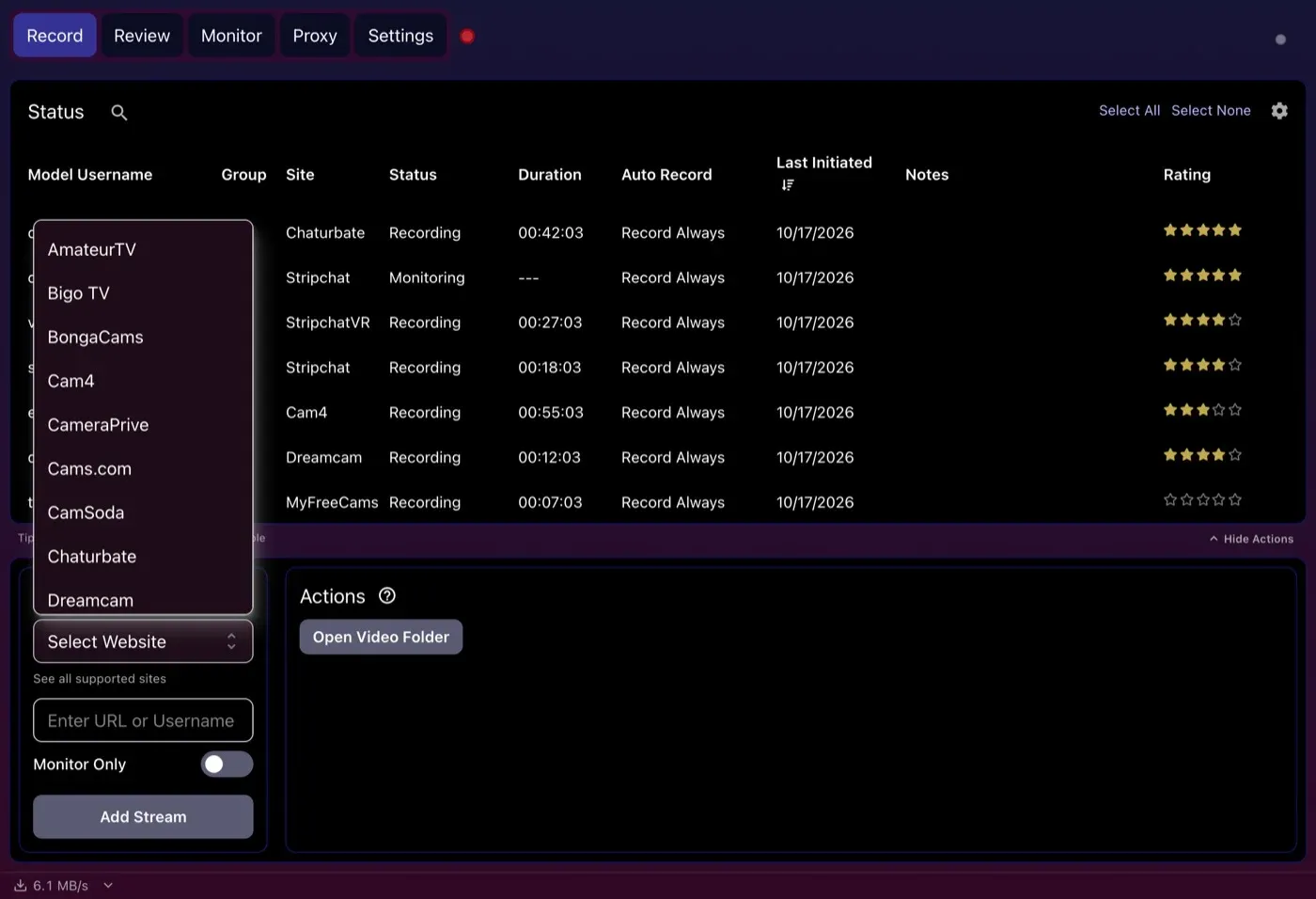
Choosing a site in the Add Stream panel. The list carries on past Dreamcam through all 24 built-in sites.
VR is the widest gap. CaptureGem saves VR shows as side-by-side 120° fisheye MP4 files, with names ending in _F120_LR, that headset players such as HereSphere open directly. Our VR playback guide lists the player settings. CTBRec includes Dreamcam in its site list but says nothing about VR formats or headset playback.
Files you can play straight away
CaptureGem records the site’s source stream at the best quality on offer and saves it as MP4 by default, or MKV if you prefer. There’s no remux step to set up and no second app to run before your phone, TV or laptop will play the file.
A library instead of a folder
This is where using the two apps feels most different. Every finished CaptureGem recording shows up on the Review tab with an image grid made for you, so you can see what’s in a file before opening it. You can filter by model or tag, sort, mark favorites, set a review status, and protect recordings you never want deleted.
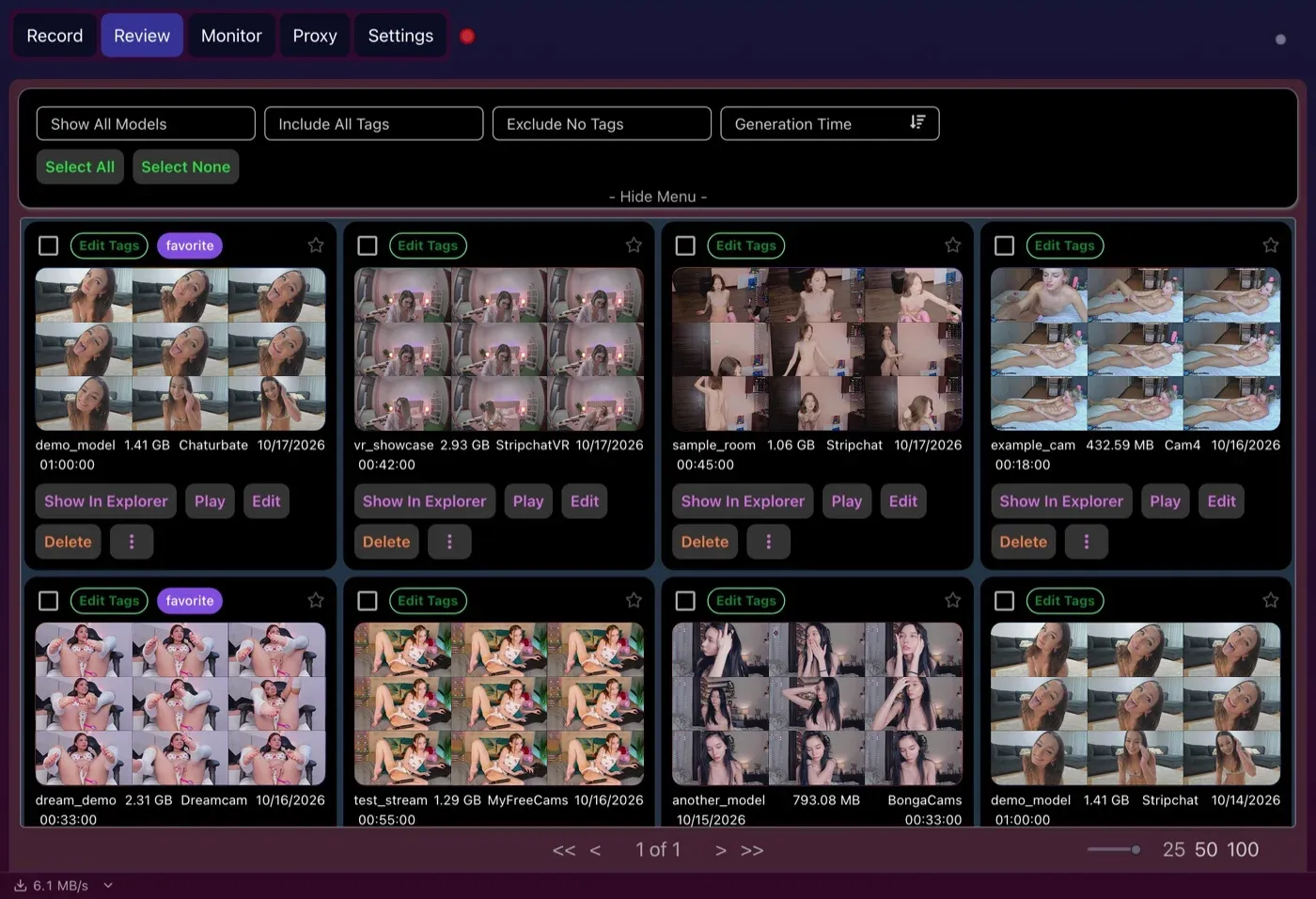
CaptureGem makes these preview grids by itself for each recording. In CTBRec, a contact sheet is a post-processing step you configure yourself.
Trim and combine inside the app
Click Edit on a recording to open the built-in editor. Mark what to keep or drop with Add Section and Cut Section, then save what’s left as a separate file and choose whether to delete the original or create a boomerang clip. To join recordings, select several on the Review tab and click Combine Videos.
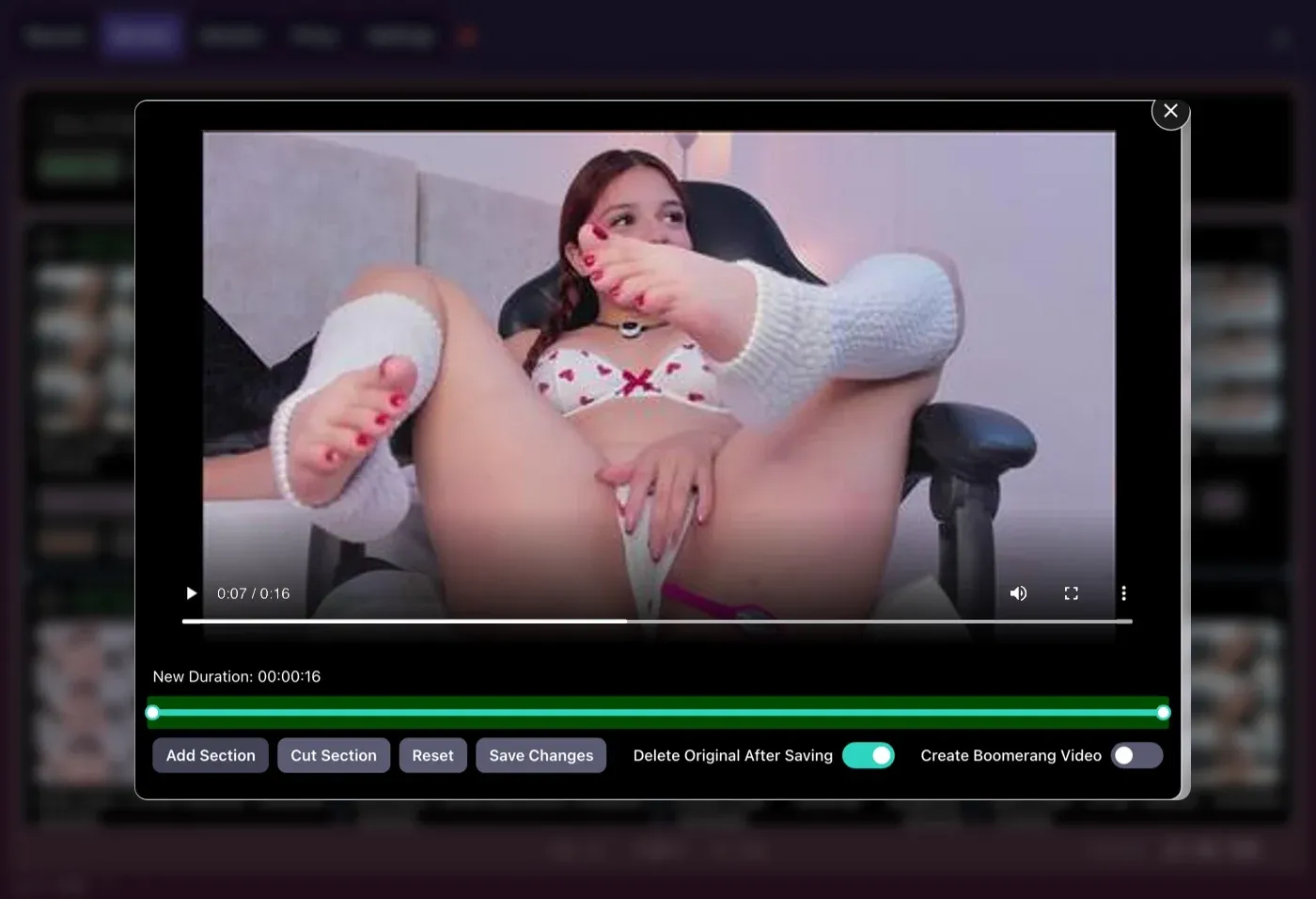
Trimming a recording in CaptureGem’s editor. With CTBRec you would usually open a separate video tool for this.
Cross-site groups
Plenty of models broadcast on more than one site. With Premium, CaptureGem lets you group one performer’s rooms together. The group records from the top entry, and if that room goes offline or private, CaptureGem records from the next site on the list instead. CTBRec doesn’t advertise anything similar.
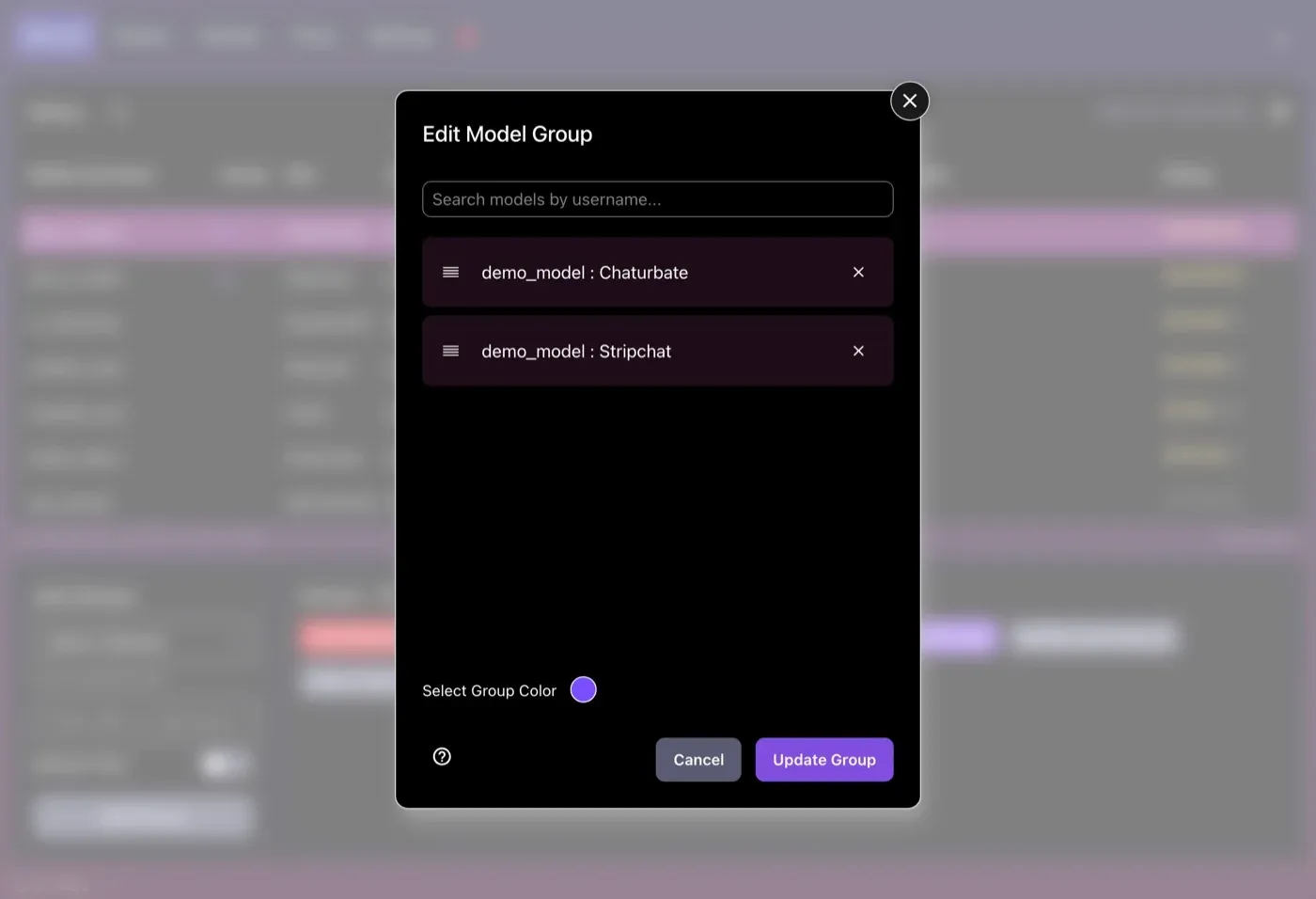
A model group for a placeholder username on two sites. The order decides which room records first.
Remote recording: an honest look
If CTBRec’s server is the main reason you use it, know what CaptureGem offers before switching. CaptureGem is a desktop app first. If you’re comfortable on the command line, its recording engine, recorderd, can run on a Linux machine with no desktop app at all, taking commands over a local HTTP API. The standalone Linux guide explains the setup, and our notes on running CaptureGem without a desktop cover the tradeoffs. It’s a power-user option rather than a remote control for the app’s interface, and six sites still need the desktop app: LiveJasmin, XCams, ManyVids and Superlive record through the desktop app, and CamSoda and AmateurTV use its built-in browser for status checks. If a polished remote GUI is a must, CTBRec is ahead here.
Switching from CTBRec to CaptureGem
You don’t have to move everything at once. Here’s the order we’d follow:
- Install CaptureGem. Download it free for Windows, macOS or Linux. You don’t need an account to start.
- Set your folders and format. In Settings, choose where finished videos and temporary files go, and pick MP4 or MKV. The settings overview on capturegem.com explains every option.
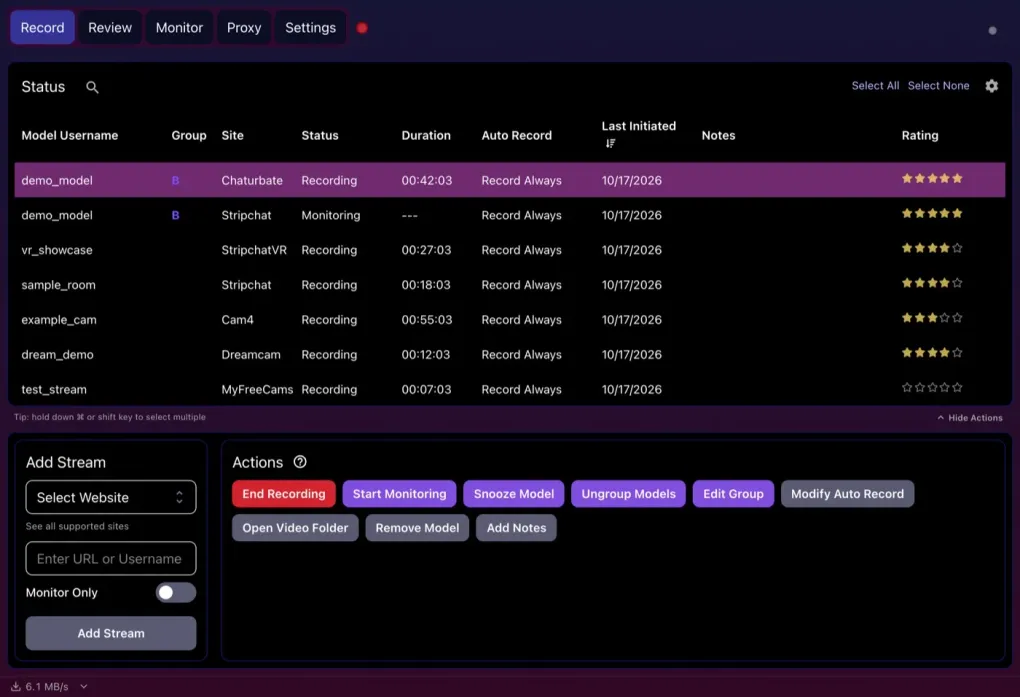
- Bring your model list across. Copy the usernames or room links from CTBRec. On the Record tab, pick the site under Select Website, paste the link or username into Enter URL or Username, and click Add Stream. Our first recording guide walks through it with pictures.
- Test on the free version. It takes up to 10 models, caps each recording at 5 minutes, and records only models who are already live at the moment you add or start them. That’s enough to confirm your sites work.
- Turn on auto-record with Premium. Select a model, open Modify Auto Record and choose Record Always, or switch on Auto Record All Newly Added Models in Settings. Our guide to using auto-record reliably explains each mode.
- Group cross-site rooms. Select a performer’s rooms on different sites, click Group Models, then drag them into the order you want them tried.
- Retire each model from CTBRec once CaptureGem has saved a good recording of them. Recording the same room in both apps downloads the stream twice and splits your bandwidth.
Your old .ts files keep playing in mpv or VLC, so there’s no rush to convert them. Before your new library grows, read where CaptureGem keeps its files so you can plan backups.
Which should you choose?
Choose CTBRec if:
- you want free, open-source software and would rather donate than pay for a plan;
- you need a recording server controlled from a desktop GUI;
- you enjoy building your own FFmpeg and script post-processing.
Choose CaptureGem if:
- you record on sites outside CTBRec’s list of 11, or you want VR shows;
- you want MP4 files without a remux step;
- you’d rather browse a visual library than a folder of .ts files;
- you want trimming, combining and cross-site groups built in;
- you want to spend your time watching rather than configuring.
Verdict
CTBRec is a respectable free recorder with a standout server mode, and if that’s exactly what you need, it’s a fair choice. For a complete recording workflow, with more sites, VR, files that play anywhere and a library that organizes itself, CaptureGem is the better tool and our recommendation. Start with the free download, and when you’re ready to record unattended, compare the Premium plans.
One last note: only save streams you’re allowed to keep, and stay respectful of performers, site rules and local law.
Loading comments...